To open the Measure Builder, go to Company setup > Measures. Click “+ Add measure” or “+ Add from template” to add a measure.
Click the Measure Builder icon. The icon looks like three stacked building blocks and appears on the right-hand side when hovering over the measure.

Measure Builder icon
The Measure Builder allows users with Setup access to tailor-make sustainability measures. All relevant sustainability data can be captured with this tool.
The Measure Builder is a visual editor with drag-and-drop capabilities. The Measure Builder can be set up to draw information from measure templates.
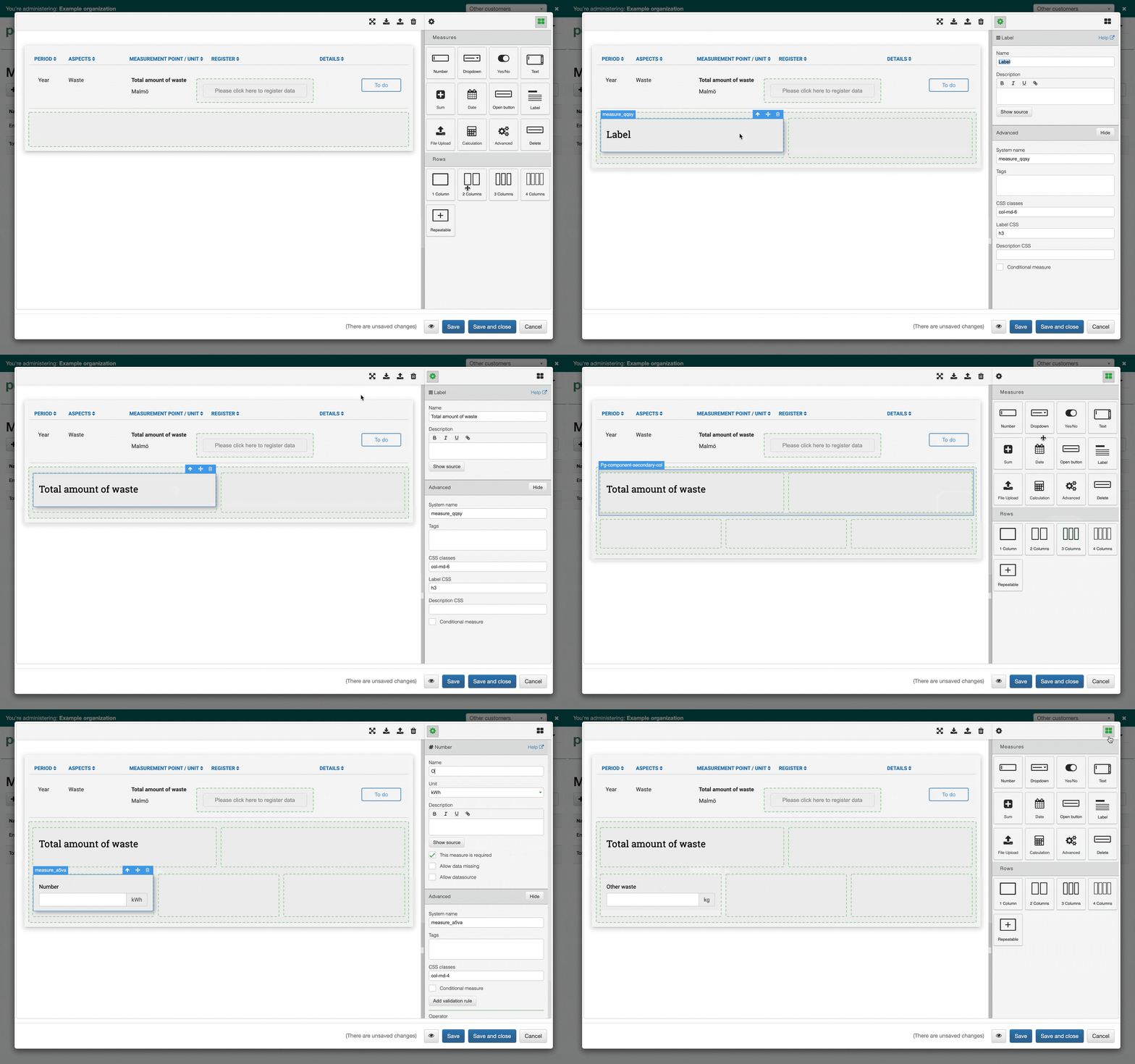
The Measure Builder
The Measure Builder is made up of three parts: the canvas, measure inputs, and rows. There is a display of what is possible for each type of measure input. Measures can be dragged into the canvas of rows and columns, and validations and conditional measures can be added. The advanced features make it possible to build complex sustainability reporting forms.
Errors are highlighted with detailed feedback, including suggestions on how to solve them.
Learn more about the tool in the articles in the measures folder.
Was this article helpful?
That’s Great!
Thank you for your feedback
Sorry! We couldn't be helpful
Thank you for your feedback
Feedback sent
We appreciate your effort and will try to fix the article