Once a user is added to the platform, connect them to the relevant org.units or measures.
With Setup access, open the user menu in the upper right corner and go to "Company Setup".
 Company Setup in the user menu
In "Company setup > Organization" view, to start connecting users to the org units either:
A. Switch to Table view (top right) then click the Edit (pen) to the right on the row for a specific org.unit.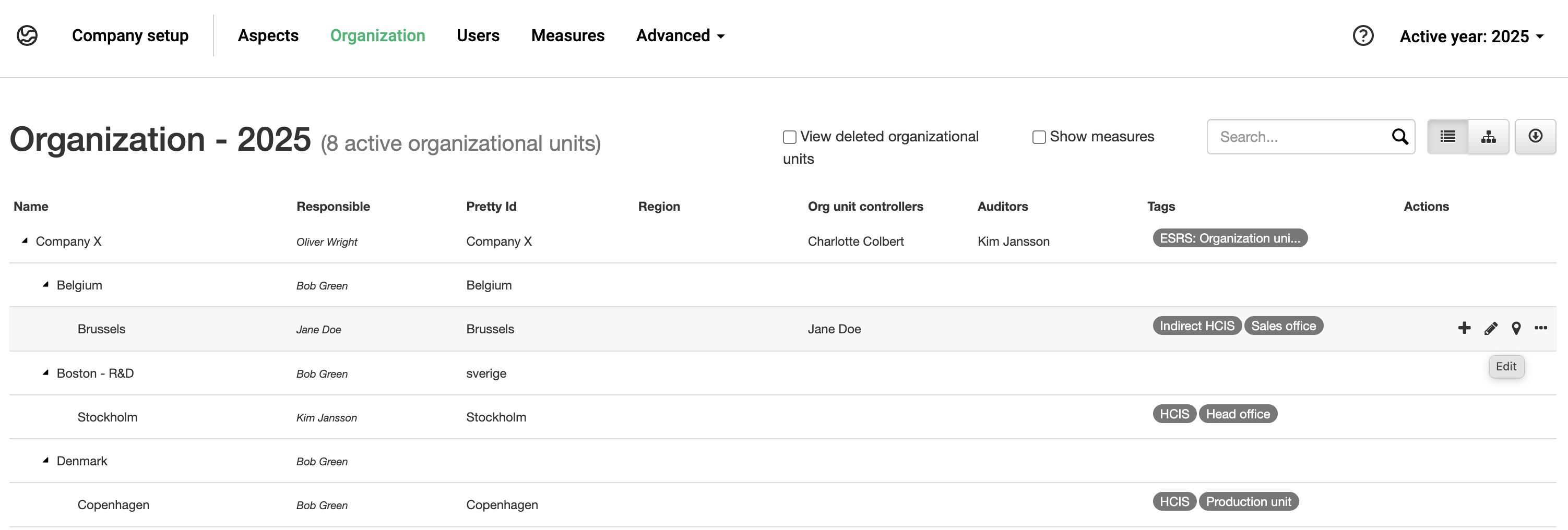
Edit an org.unit in Table view
B. Or in the Org tree view, click the Edit (pen) icon on a specific org.unit.

Edit (pen) icon on an org.unit in Org tree view
How to connect users with different assignments to the org.unit
Org unit responsible To connect a user as an org unit responsible (often used in combination with the four-eyes-principle process), click the dropdown and search for a user to add. Click the user's name to add them as a Responsible.

How to connect user to the org.unit
- Org unit controllers To connect a user as a Organizational unit controller click the dropdown and search for a user to add. Click the user's name to add them as a org unit controller.
- Org unit collaborators:To connect a user as a collaborator for this organizational unit, click the dropdown and search for a user to add. Click the user's name to add them as a org unit collaborator.
- Auditors To connect a user as an auditor to this org.unit (often used in combination with the four-eyes-principle process), click the dropdown and search for a user to add. Click the user's name to add them as an auditor.
When the relevant users are connected to the org.unit, click “Save”.
Was this article helpful?
That’s Great!
Thank you for your feedback
Sorry! We couldn't be helpful
Thank you for your feedback
Feedback sent
We appreciate your effort and will try to fix the article