Navigate to Company setup, Advanced, and Setup overview to view environmental aspects, organization, users, and measures. Consult this view during setup to ensure implementation progresses as planned.
Use the search function to narrow down the information displayed.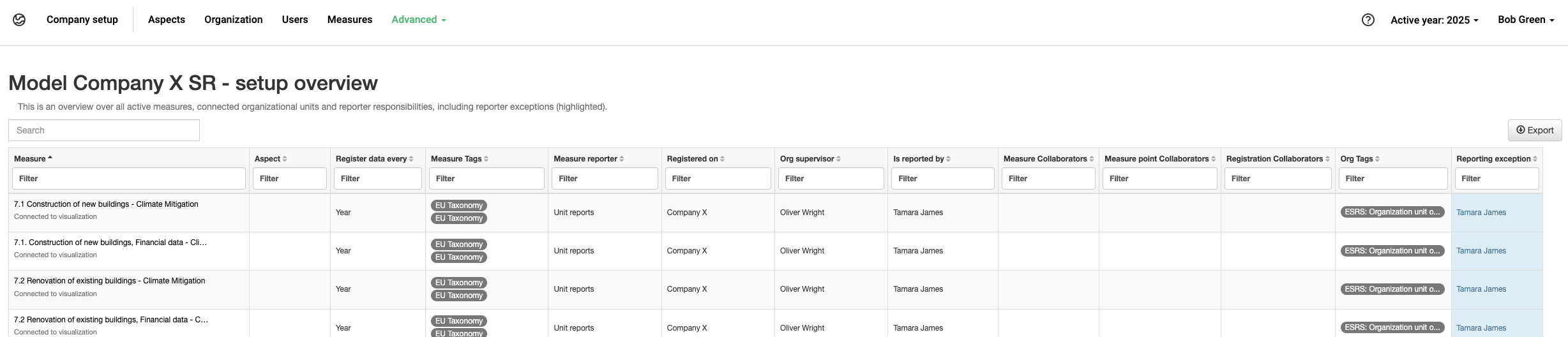
Setup overview for an example organization
Description of the columns:
- Measure – Measure name, including description
- Aspect – Aspect name
- Register data every – The reporting periodicity of the measure
- Measure tags – The tags connected to the measure
- Measure reporter – The reporter type selected in Edit measure
- Registered on – The organization this row relates to
- Org. supervisor – The supervisor of this specific org.unit
- Is reported by – User reporting on this measure and org.unit
- Measure collaborators – Collaborators added directly to a measure in Edit measure
- Measure point collaborators – Collaborators added to an org.unit via “Edit” on the Organization page
- Registration collaborators – Collaborators added to a registration for a specific measure on the Data reporting page
- Org. tags – The tags connected to the org.unit
- Reporting exception – Applies when the reporter in Is reported by has been adjusted by changing the reporter for this measure on the org.unit via the Organization page. In these cases, Is reported by differs from Measure reporter, or from Org. supervisor if the measure reporter is set to “Unit reports”.
Was this article helpful?
That’s Great!
Thank you for your feedback
Sorry! We couldn't be helpful
Thank you for your feedback
Feedback sent
We appreciate your effort and will try to fix the article