Measures must be set up before they can be linked to an org.unit. Read how to create a measure. Once measures are set up, they can be connected to org.units.
Add a measure to an org.unit
Click the Select measures icon (map pin icon) and use the arrows to select measures. The left side lists the measures available to link, and the right side lists the measures selected for the unit. The right side also shows who is responsible for reporting the data.
- Unit reports - The supervisor for that unit.
- Collaborators - Add collaborators here. See below.

Connecting a measure to an org.unit
Generate the registrations before reporters can register data on this measure.Add collaborators to an org.unit
Collaborators can be added on several levels:
- Org.unit level. See details below.
- Registration level, see Add and manage collaborators.
- Measure level. Go to Edit measure under Company Setup > Measures.
Add collaborators to all measures in an org.unit
To add collaborators to all measures connected to an org.unit, go to Company Setup > Organization and click the Edit icon (pen) on the org.unit in the organization tree. Add users under Collaborators.
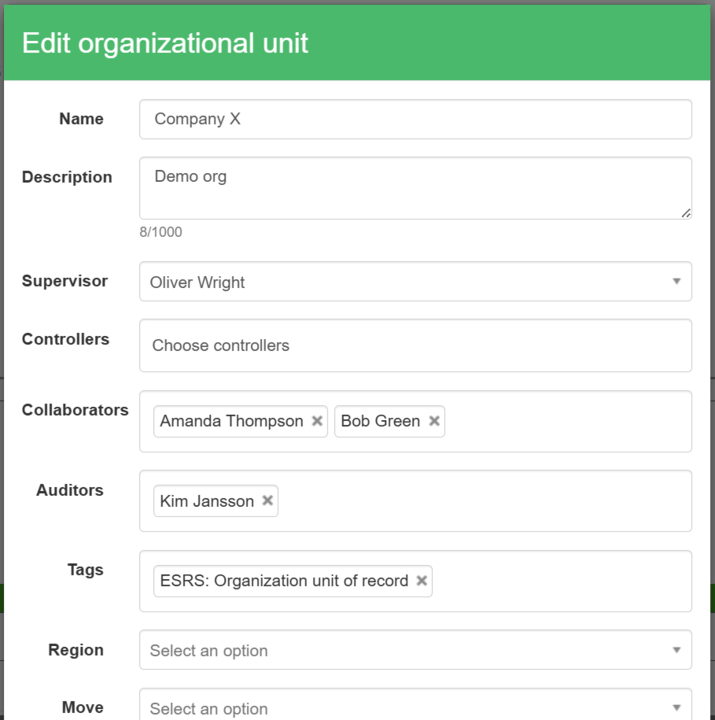
Collaborators field when editing an org.unit
Removing collaborators at org.unit level also removes them from all underlying registrations.
Add collaborators to a single measure on an org.unit
Collaborators can also be added to single measures during setup. Add the collaborators to each measure and click “Save”.

Adding collaborators to measures during setup
Add reporting exceptions
The people responsible for reporting a specific measure for a specific unit are:
- Unit reports - The supervisor for that unit.
- Collaborators - A specific user added as responsible for that measure.
Open the dropdown list for the affected measures, select the correct user, and click “Save” to override the standard responsible people.

Org.unit with multiple measure points and a reporting exception for Corporate citizenship, with Cecilia Wendt as the reporter
Copy measure relationships from one org.unit to another
The options to copy and paste measure points are in the top right-hand corner. The paste option pastes the measure exactly as it is including any reporting exceptions.

Copying a full measure structure to another org.unit
Was this article helpful?
That’s Great!
Thank you for your feedback
Sorry! We couldn't be helpful
Thank you for your feedback
Feedback sent
We appreciate your effort and will try to fix the article