Thresholds on numeric questions allow reporters and controllers to detect deviations in input data.
Viewing and commenting on a deviation
Indications of if entered data are within or exceeding the acceptable deviations are present in:
- Data reporting view. For reporters and collaborators to see thresholds, they need to have:
- Access to historic data on the measures they report on. Set-up access users can either grant access to previous values on setup level under Settings or on individual measure level in Company setup.
- Set a reference period. The diff is calculated by comparing values from active period and reference
- A threshold set (see below).
- Review data view Deviations will be shown on each org units answer. Learn about the Review data view
Color coding of deviations
- Blue = Within the acceptable threshold
- Yellow = Exceeding the acceptable threshold
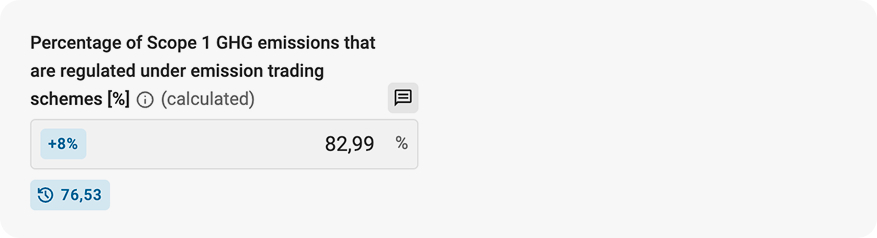
Input data is within the acceptable threshold.
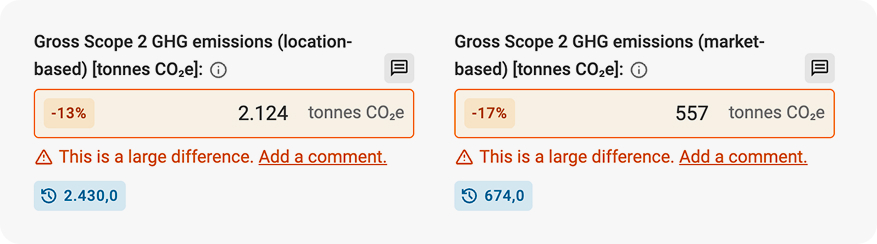
Data exceeding the acceptable threshold for these input fields.
Explain why entered data is exceeding a threshold by using comments.
Limitation: Deviations are not available for the question type Repeatables.
Possible to set thresholds on three levels
- General threshold. Applies on all measures independent of reporting period and org.unit.
- Measure specific threshold. Applies on all numeric question within that measure.
- Individual measure point threshold. Applied on the specific question.
Override thresholds
Thresholds set on measure points level overrides threshold set on measure and general levels. Measure level threshold overrides General threshold.
Add a general threshold
Go to Settings > Registrations > General threshold. Set at general threshold between 0 and 1000. This setting is only available for users with set-up access.
Add a threshold to a measure
In Company setup under Measures, configure a threshold for all numeric fields in a measure by clicking "Edit measure," adding the threshold, and saving.

Add a threshold to a single measure point
To add a specific threshold for a single measure point or override the threshold assigned to the measure, go to the Measure builder for the specific measure point. Please read more on the properties of numeric inputs.
Read more on thresholds in relation to number, sum, and calculation measures.
Was this article helpful?
That’s Great!
Thank you for your feedback
Sorry! We couldn't be helpful
Thank you for your feedback
Feedback sent
We appreciate your effort and will try to fix the article