Activity Capture
Introduction to Activity Capture
Activity data has historically been one of the most time-consuming parts of carbon accounting. Traditional workflows often rely on spreadsheets, email exchanges, and manual data entry, which increases the risk of human error.
Position Green developed Activity Capture to reduce manual data collection. Activity Capture uses existing invoice data to identify what was purchased and how much was purchased, then converts that information into activity-based emissions data.
Invoices are a useful source because they already exist in corporate systems and often contain line-item details. By extracting this information, Activity Capture improves data accuracy in the GHG inventory. This is especially useful for Scope 3.1 Purchased goods and services, which has traditionally relied on spend-based approximations.
Activity Capture works in the following way:
- Invoice or receipt line items are interpreted using AI.
- Activity data is identified.
- Activity data is matched with emission factors.
- Data is validated by the user.
- Validated data is added to the correct scope categories in the GHG inventory.
Activity Capture helps organizations move from broad spend-based estimates to more granular, activity-based emissions data by capturing invoice line-item details and matching purchases with relevant emission factors.
When to use Activity Capture
Use Activity Capture when actionable data for purchased goods is limited. The primary use case is Scope 3.1 Purchased goods and services, but Activity Capture can also support Scope 1, Scope 2, and additional Scope 3 categories.
Activity Capture delivers the most value for product-heavy or material-heavy procurement. It works best for sectors with many Environmental Product Declarations (EPDs), such as IT hardware, construction materials, and office furniture.
Activity Capture is less suitable for service-heavy procurement, such as maintenance and consulting, where invoices often lack clear units or product references. Missing or vague product descriptions can reduce result quality. Improve results by working with suppliers to improve invoice structure and detail.
Suitable use cases
- Enriching Scope 3.1 Purchased goods and services
- Product-heavy procurement
- Procurement within EPD-rich sectors
- Invoices with clear line-item descriptions
Less suitable use cases
- Vague or missing invoice descriptions
- Service spend with no clear unit or product reference
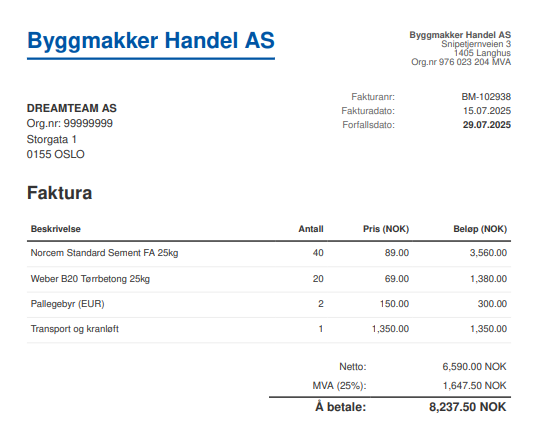
Example invoice showing the type of detail needed for Activity Capture.
For optimal Activity Capture results, invoices should include:
- Line-item description or product name
- Quantity
- Unit
- Invoice date
- Price, which can be useful for extrapolations
- Currency
- Supplier name
- Invoice number
- Product code, if available
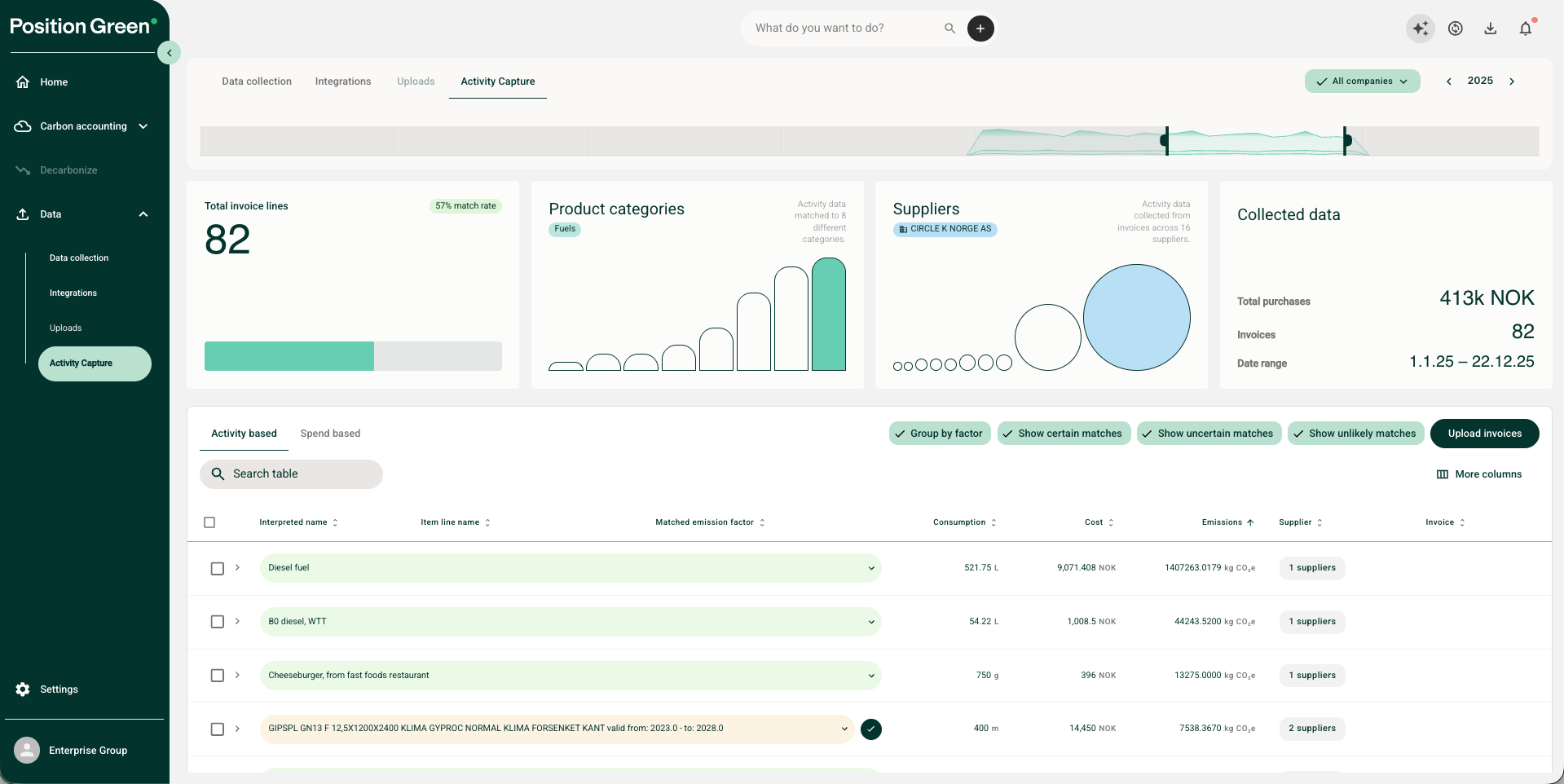
Example of invoice information used by Activity Capture.
Prerequisites
Before using Activity Capture, make sure the following prerequisites are in place.
Willingness to share invoices
Activity Capture may not be suitable for organizations that treat invoice details as highly confidential. If needed, scrub or sanitize invoice data before sending it to Position Green to remove sensitive information.
If only a partial set of invoices is submitted, the customer is responsible for ensuring the completeness of the final results.
Ability to ingest invoices
Ingest invoices using one of the following methods:
- Send data to the API: Use this option when working with data warehouses, data lakes, or centralized invoice management systems. This gives direct control over which invoices are uploaded, but the customer remains responsible for data completeness.
- Use supported ERP integrations: Position Green can directly extract files from compatible ERP integrations that support Activity Capture. Some ERP providers restrict invoice file access, which can prevent ingestion. If an integration for the ERP or invoice management system is not available, Position Green can scope a dedicated setup project.
- Upload PDFs manually: Use this option when no supported integration is available or when automated transfers are not preferred. Export invoices from the ERP or invoice handling system and upload them directly to Position Green.
For more information about API and integration methods, see the integration guidance.
Read and match invoice lines to emission factors
Activity Capture uses AI to parse and interpret individual invoice line items. After extraction, the system reviews each line item and matches it with a corresponding emission factor.
To support accuracy and consistency, the matching process happens automatically before results are shown. The system evaluates each line item sequentially and applies a data quality hierarchy to select the most appropriate emission factor.
Line-item parsing and interpretation
Activity Capture uses an AI model to read each invoice line item and convert it into a product name. The accuracy of this extraction depends on the model used. More advanced models usually provide better interpretation than lower-cost alternatives, which can improve emission factor matching.
Data quality hierarchy
Activity Capture first prioritizes matching invoice line items with Environmental Product Declarations (EPDs). EPDs are manufacturer-generated emission factors sourced from EcoPlatform and are product-specific.
If an EPD is not available, the system matches items against average activity-based emission factors from the Position Green emission factor library.
If verified activity-based factors are not available, the system defaults to Position Green’s proprietary EEIO model for spend-based estimates. This is typically used for service procurement or entries with incomplete data. Read more about the EEIO model here.
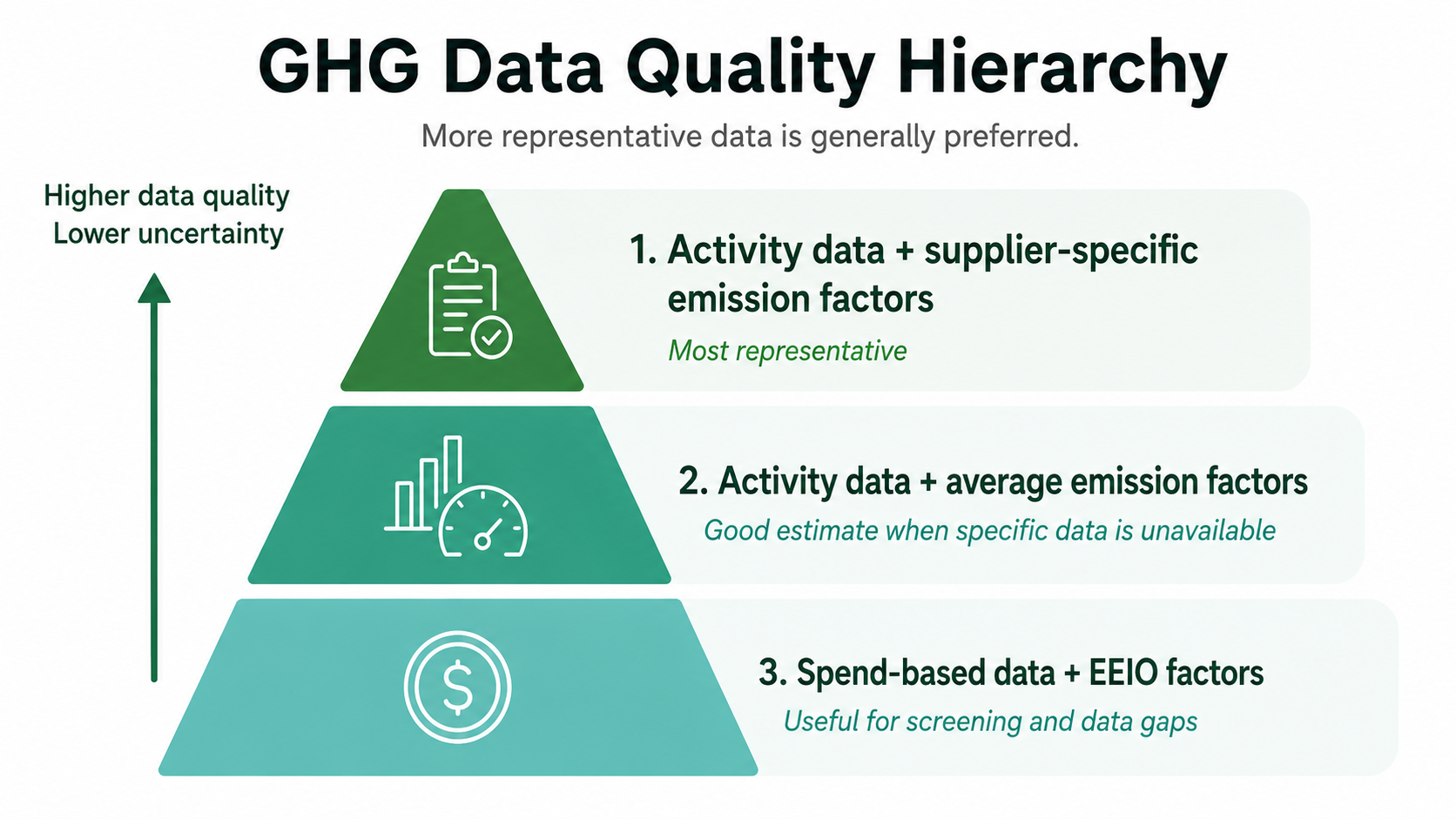
Data quality hierarchy for matching invoice lines to emission factors.
Confidence scores
When matching line items with emission factors, the system assigns a confidence score to each match based on two criteria:
- Certainty of the interpreted name: Has the exact item or service purchased been identified correctly?
- Certainty of the matched emission factor: Has the item been paired with the most appropriate emission factor?
Based on these evaluations, results are categorized and color-coded as high confidence matches, uncertain matches, or unlikely matches.
Validate and improve results
After data ingestion and processing, validate the results. Validation can be performed in Data immediately after ingestion or inside specific collections in GHG emissions.
Recommended data validation workflow
Start with high-uncertainty data to make validation efficient:
- Filter for unlikely and uncertain matches.
- Sort material rows by cost and emissions from highest to lowest.
- Review the original invoices linked to individual line items.
- Adjust emission factors in bulk by grouping entries, searching for alternative EPDs or average activity-based factors, or using the EEIO spend-based calculation model.
- Change scope category placements in bulk across multiple selections.
- Exclude irrelevant or undesired lines from the final inventory.
- Approve lines individually or in bulk.
- Send validated lines directly to the relevant collections from the validation view.
Reuse previous matches
The system saves user modifications, including adjustments to emission factors or scope categories. During later data ingestions, identical or similar records are automatically mapped to the user-defined locations. The system highlights these remembered adjustments in blue.
Analyze results
After validation, use Activity Capture results to:
- Identify products or suppliers with high impact
- Review match rates
- Export data to Excel
Traceability and auditability
When line items are ingested into Position Green, the original invoice is automatically attached as supporting documentation for the interpreted product name and selected emission factor.
Review emission factor documentation by clicking the matched factor. A white paper describing the methodology behind the EEIO spend-based emission calculation is also available after signing a Non-Disclosure Agreement.
Potential for improvement and future development
Activity Capture is a new capability in Position Green and is continuously being improved. Through the EEIO framework, spend-based estimates provide broad data coverage from day one. The current activity-based match rate typically ranges between 30% and 50%, depending on the level of detail in the invoices.
Optimize invoice data quality
Improving the granularity and completeness of invoice data is one of the highest-impact ways to improve Activity Capture results. Work with suppliers to improve the quality of invoice information.
Refine processing algorithms
Improvements to the logic that scans line items and aligns them with emission profiles can improve matching performance. The system also learns from previous manual inputs, allowing the algorithm to improve based on user feedback.
Evaluate alternative AI architectures
Different AI models produce different results. Lower-cost models may identify more possible activity-based matches but with lower precision, while more advanced models may deliver higher precision across a narrower set of items. A balanced model approach can improve both match accuracy and match volume.
Expand the emission factor library
A key limitation is the number of activity-specific emission factors available in the emission factor library. Expanding the library, especially with supplier-specific and product-specific emission factors, will improve the match rate.
Use AI-generated emission factors
Position Green is exploring ways to generate emission factors using AI while aligning with formal validation and verification rules. These methods are not yet widely endorsed by formal standards groups, such as the Science Based Targets initiative. As regulatory and auditing frameworks evolve, these techniques may become viable when supported by adequate verification trails.
Expand the use case beyond invoices
Although Activity Capture is currently tailored for receipts and invoices, the same approach can be applied to other file formats to extract activity information from different document types.
Appendix: Key concepts and descriptions
| Term | Description |
|---|---|
| Activity data | Quantified information about a physical activity, product, or service purchased or consumed. Activity-based calculations are considered higher quality than spend-based calculations because they support decarbonization to a greater degree. |
| Invoice line item | A specific product or service listed on an invoice. |
| Emission factor | A factor used to convert activity data into greenhouse gas emissions. |
| EPD | Environmental Product Declaration containing product-level environmental data. |
| Matching | The process of linking invoice line items to relevant emission factors or product data. |
| Confidence score | An indicator of how reliable or certain a match is. |
Was this article helpful?
That’s Great!
Thank you for your feedback
Sorry! We couldn't be helpful
Thank you for your feedback
Feedback sent
We appreciate your effort and will try to fix the article