Turn ideas into reductions.
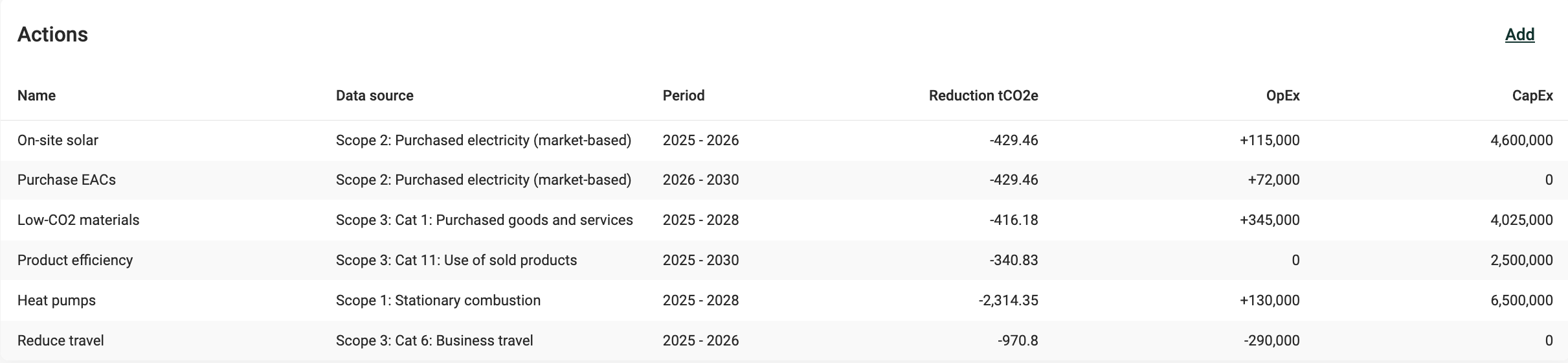
Actions represent concrete measures—like efficiency upgrades, fuel switching, or renewable energy sourcing—that change your projected emissions. Add an action to specify its impact and timing, then see how your plan stacks up against your target.
Tip: You can also generate AI-suggested actions to speed up planning. These use your data to propose credible starting points for emission reductions, complete with impact estimates and assumptions.
Learn more: How AI-suggested actions work
Adding or editing an action
Whether you create an action manually or review an AI-generated suggestion, you'll see the same fields below. Each defines how the action affects your decarbonization plan.
Name: enter a clear, descriptive name so it’s easy to identify and compare later.
Decarbonization lever: select the primary mechanism for reducing emissions. If multiple levers could apply, choose the most relevant one.
Description (optional): add details that explain what the action involves or how it will be carried out.
Start and end year: enter the timeframe when the action will take place. You can only choose years within the scenario’s timeframe.
Data source: select the scope and category this action affects.
Organizational unit (optional): if your action targets specific org units, select them here. Leave blank to apply it across all units.
Reduction potential: enter the estimated percentage of emissions you can reduce or avoid through your actions, relative to the reference year selected. You can determine this by consulting relevant studies or benchmarks that provide reduction potential ranges. If enabled, our AI Analyst can also offer an indicative estimate.
Implementation rate: specify how broadly the action is applied across selected scope/category. For example, if 10% of your vehicle fleet is impacted, enter 10%. If you model multiple mutually exclusive actions (e.g., switching to electric or biodiesel vehicles), their combined implementation rates must not exceed 100%.
OpEx (optional): enter the yearly change in OpEx. Enter a positive value for an increase in costs, or a negative value to reflect cost savings.
CapEx (optional): enter the total CapEx investment required.
Assumptions (optional): use this field to capture the reasoning behind your action inputs—for example, the source of a reduction potential, expected implementation timing, or any constraints you’re factoring in. Recording assumptions makes it easier for you (and colleagues) to understand, review, and adjust actions later.
Was this article helpful?
That’s Great!
Thank you for your feedback
Sorry! We couldn't be helpful
Thank you for your feedback
Feedback sent
We appreciate your effort and will try to fix the article