- To edit an org.unit, click the user initials and select Company Setup.
- Go to Organization in the top menu.
- Click the pen icon on the org.unit (either in Org tree view. or in the Table view. Switch view in the top right).
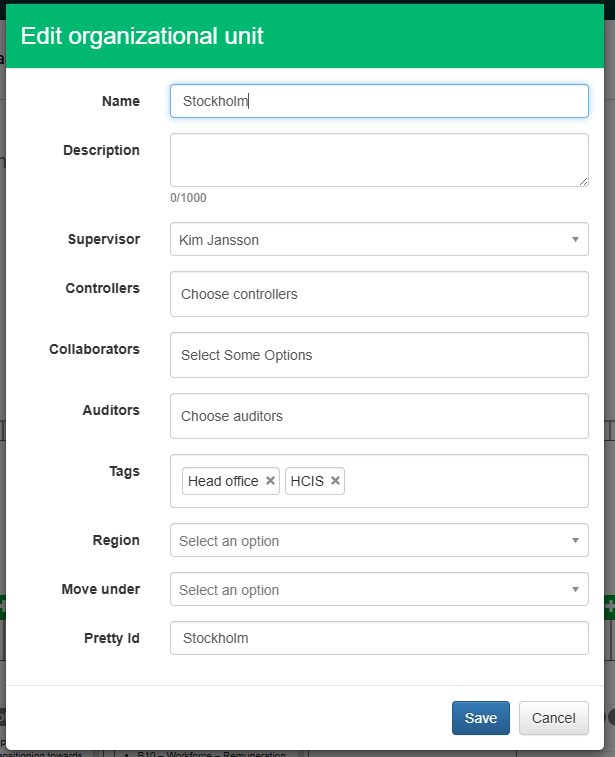
Edit org.unit form
- Name - Rename the org.unit.
- Description - Add or edit a description.
- Responsible - The person responsible for the org.unit.
- Org unit ontrollers - Controllers can access this part of the organization and its subunits. The controller is labeled “Org. unit Controller” in Users. The responsible ensures that all requested data is reported and that the reported data is within a reasonable deviation. If not, the responsible can send a reminder or an email from the platform asking a collaborator for additional data.
- Org unit collaborators - Users who have access to the data for one measure or one measure point. Note: Removing collaborators at org.unit level also removes them from all underlying registrations. Collaborators can also be added to a single measure on an org.unit. Read more here.
- Auditors - Add auditors who should have read-only access to this part of the organization, including the subunits. Auditors are labeled “Auditor” in Users.
- Tags - Add or change tags on the org.unit (use built-in tags such as Office or Production plant, or create new tags).
- Region - Region names are connected to the map in the lobby. If a parent unit is connected to a region, all subunits are included in the parent's region on the Global impact map. If a subunit has a different region than its parent unit, the subunit's region takes precedence. For example:
- Org.unit USA has United States of America configured as its region.
- Org.units Florida and California are subunits of USA and have no region configured.
- US Virgin Islands is also a subunit of USA but the region is set as United States Virgin Islands.
- The data for Florida and California is included in the results for the USA on the map.
- The data for the US Virgin Islands is included in the United States Virgin Islands on the map.
- Org.unit USA has United States of America configured as its region.
- Move under - If a unit belongs in another part of the organization, use Move under to change the placement in the tree.
- PrettyID - Do not change the PrettyID once it is set. This property is used in integrations and other data operations to refer to the org.unit.

Global impact map
To change the organizational structure while keeping historical data correct in the new structure, use the Year functionality. It allows different org structures in different years while keeping historically reported data.
Was this article helpful?
That’s Great!
Thank you for your feedback
Sorry! We couldn't be helpful
Thank you for your feedback
Feedback sent
We appreciate your effort and will try to fix the article