Activity Capture
Activity Capture reads your invoices and turns purchase lines into activity data: what you bought, and how much. It then matches each line to an emission factor. You review the result before it lands in your GHG inventory.
Collecting activity data used to mean spreadsheets, emails and typing. Invoices already sit in your systems, and they often list each product with a quantity. That makes them a good source, especially for Scope 3.1 Purchased goods and services, where most companies rely on spend-based estimates.
How it works
- Read. AI reads each invoice line and finds the product, quantity and unit. If the unit is missing or packed into the description, it estimates it.
- Match. Each line gets an emission factor: a product EPD first, then an average activity factor, then a spend-based factor as the fallback.
- Score. Each match gets a confidence score from 0 to 100%.
- Review. You check the matches, fix what is wrong and confirm.
- Send to your inventory. Confirmed lines go to the right scope category, and into a group if you choose one.
When to use it
Activity Capture works best for products: IT hardware, construction materials, furniture, and anything with a clear product name and quantity. These sectors have many Environmental Product Declarations (EPDs). The main use is Scope 3.1, but it also helps with Scope 1, Scope 2 and other Scope 3 categories.
It works less well for services such as consulting, maintenance and subscriptions. Those invoices rarely have units or product names, and vague lines like "Misc" or "Order 4471" can't be matched. These lines stay spend-based, and they still count in your inventory.
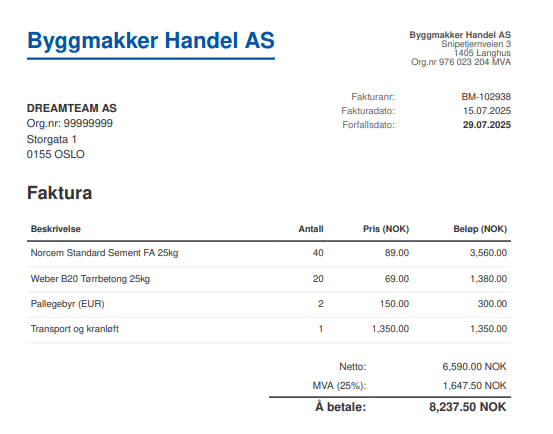
Example invoice showing the type of detail needed for Activity Capture.
The more information like the bullets below an invoice has, the better the match:
- Line description or product name
- Quantity
- Unit
- Invoice date
- Price (useful for extrapolation)
- Currency
- Supplier name
- Invoice number
- Product code, if there is one
However, the minimum information required is a supplier name, a line description and a unit. The unit can be in its own column or inside the description.
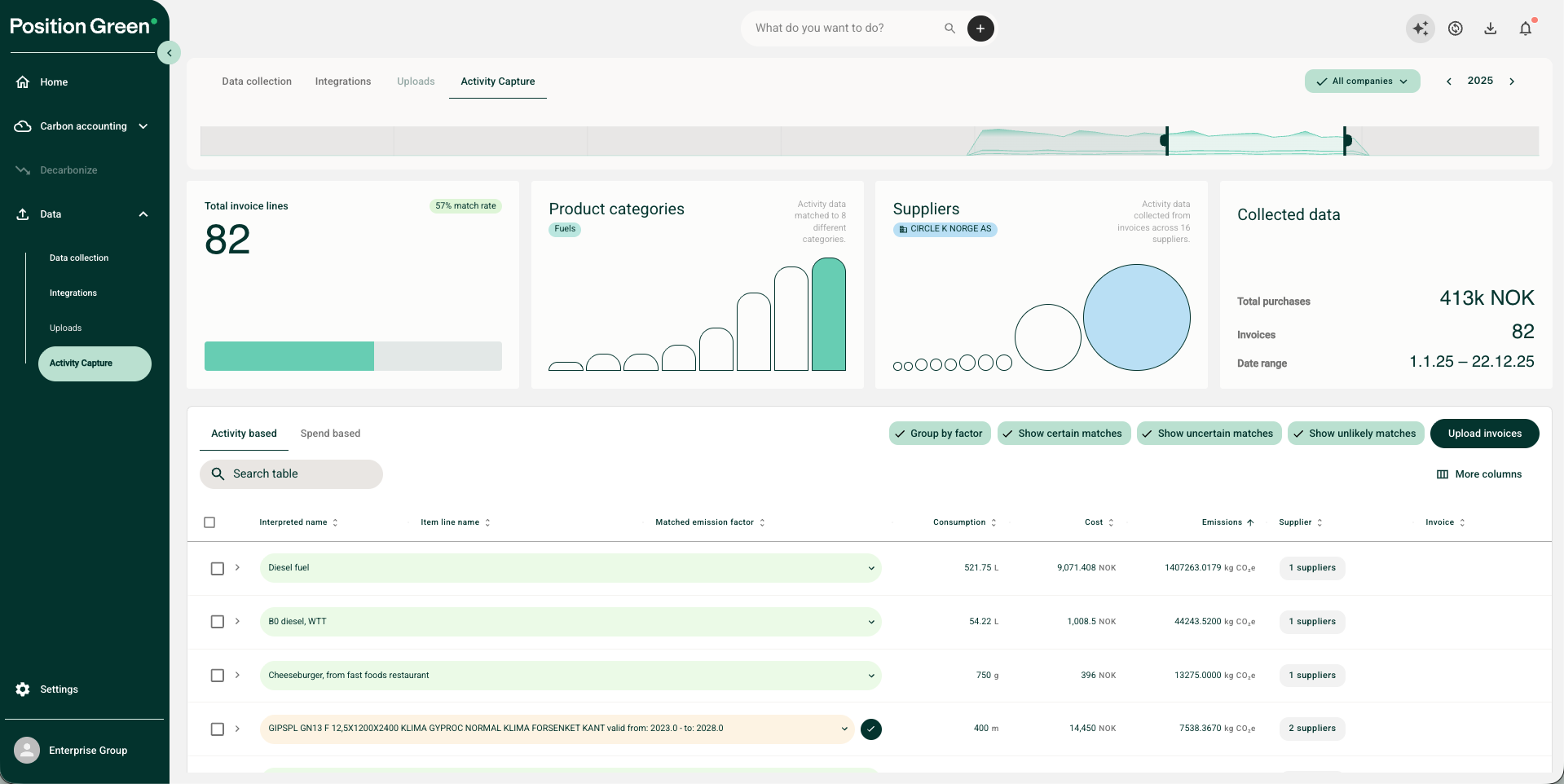
Example of invoice information used by Activity Capture.
Before you start
Sharing invoices. Activity Capture reads the whole invoice. If your invoices hold confidential details, remove them before upload. If you send only some of your invoices, you are responsible for the completeness of the result.
Getting invoices in. You have four options:
- Upload PDFs. Go to Data → Data collection → Activity Capture and upload PDF invoices, or a ZIP file of PDFs.
- Upload Excel or CSV. Upload activity data as a spreadsheet. Map your columns once and the mapping is saved for the next upload.
- Connect your ERP. Some ERP integrations can send invoice files straight to Position Green. Some ERP providers block access to invoice files. If there is no integration for your system, we can scope a setup project.
- Use the API. Good for data warehouses, data lakes or central invoice systems. You choose which invoices to send, and you are responsible for completeness.
See Integrate with Position Green APIs for the API.
Large files take time to process, and uploads run one at a time. While you set up, avoid uploading more rows than you need.
How lines are matched
The AI turns each invoice line into a product name. Then the system looks for the best emission factor, in this order:
- Product EPD. A product-specific factor from the manufacturer, sourced from EcoPlatform.
- Average activity factor. From the Position Green emission factor library.
- Spend-based factor. From Position Green's EEIO model, based on the supplier's sector and region. This is the fallback, often used for services. Read more in the EEIO methodology overview.
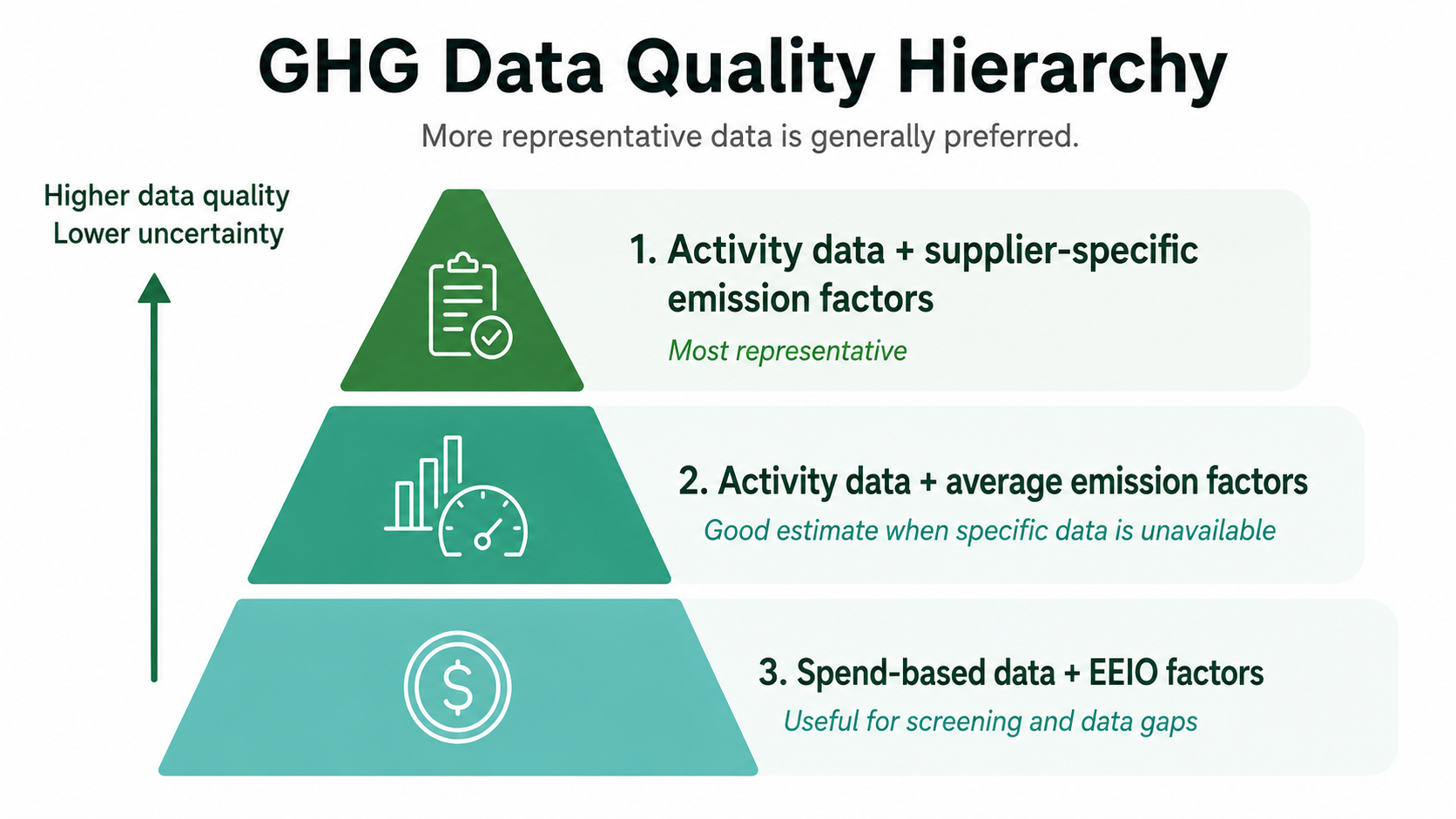
Data quality hierarchy for matching invoice lines to emission factors.
Known products are matched from a shared product library, so common items match faster and more consistently over time.
Taxes and social payments are moved to an Excluded category automatically. You can include them again if you need to.
Confidence levels
Each match gets a score from 0 to 100% for how sure the system is. The score covers two things: was the product identified correctly, and is the factor the right one for it? The app groups scores into three levels:
| Level | Score | What it usually means | What to do |
|---|---|---|---|
| Confident | 85% and up | The exact product, with a suitable region and year | Spot-check, then confirm in bulk |
| Likely | 70–84% | The right product, but a different region or year | Open the invoice and confirm or change the factor |
| Possible | Below 70% | Only a similar product, or a poor fit | Change the factor, keep it spend-based, or exclude the line |
Where your invoices lines end up
Every line lands in one of four tabs:
- Activity based: matched to an activity factor.
- Spend based: priced from the supplier's sector and region.
- Not matched: needs a factor or a decision from you.
- Excluded (separate from Activity Capture): taxes and social payments that should not be included in the inventory.
Today, 30–50% of lines usually get an activity-based match, either with a specific or an average factor. It depends on how detailed your invoices are. The rest stays spend-based, so your inventory is still complete.
Review your matches
The first screen shows a lot of colors and warnings. They mark what the system is unsure of. Nothing is broken.
Review in Data right after the upload, or later inside your groups under GHG Inventory. Start where the system is least sure:
- Filter to Possible and Likely matches.
- Sort by emissions or cost, biggest first.
- Group by emission factor or product name to fix many lines at once.
- Open the original invoice. It is attached to each line.
- Change the factor, quantity or category. Click a factor to see its documentation, or use Show variants to compare region, year and source. You can also keep a line spend-based or exclude it.
- Confirm lines one by one or in bulk, and send them to a group.
Confirming is the approval. There is no separate sign-off step.
Account as spend can be undone line by line. Show only (file name) narrows the table to one upload. To fix older data too, widen the timeline slider to cover that period before you group and change.
For more on choosing a factor, see Change an emission factor.
Check estimated quantities
When the AI has to convert or estimate a quantity, the line is flagged. For example, "Banana 15kg" with a quantity of 10 pcs becomes 150 kg. Estimates can be off, so check the large ones.
No double counting
Moving a line from spend to an activity factor replaces its spend line. Moving it back restores the spend line. The same purchase never counts twice.
What carries over to your next upload
Every match between an invoice line and an emission factor is saved in a shared product library. When the same item comes in again, Activity Capture reuses the match used most often across customers. So common products get faster and more consistent with use.
Your own changes work differently today:
- Changed factors are not reused yet. Currently, when you change a factor, that change applies to the lines you changed. The next upload of the same product is matched again from the library or by AI, so you may need to make the same change again. We are working on remembering this action in the future.
- Supplier corrections are remembered. Changes to a supplier's name match, sector or location will carry over to future uploads.
Traceability
When a line comes in, the original invoice is attached to it. It supports the product name and the factor chosen. Click a matched factor to see its documentation. Every factor change is logged with the old and new factor, the kg CO₂e and who made the change.
A white paper on the EEIO spend-based model is available after signing a non-disclosure agreement.
Analyze your results
After review, use Activity Capture to:
- Find products and suppliers with high impact
- Check your match rate
- Export the data to Excel
Get better results
Ask suppliers for clearer invoices. This is the biggest lever you have. Product names, quantities and units on every line make the difference.
What we are working on. Activity Capture is new and improves all the time. We are working on:
- Better logic for reading lines and matching factors, including learning from your corrections
- Comparing AI models, since some find more matches and others are more precise
- More product-specific and supplier-specific factors in the library, which is the main limit on the match rate today
- Reading other document types, not only invoices and excel.
We are also looking at AI-generated emission factors. Standards bodies such as the Science Based Targets initiative do not endorse them yet. We will only use them once they can be verified to the standard auditors need.
Key terms
| Term | Meaning |
|---|---|
| Activity data | A measured amount of something bought or used, such as kg, liters or kWh. Activity-based calculations are more accurate than spend-based ones and are better for planning reductions. |
| Invoice line | One product or service listed on an invoice. |
| Emission factor | The number that converts activity data or spend into greenhouse gas emissions. |
| EPD | Environmental Product Declaration: a manufacturer's environmental data for one product. |
| Matching | Linking an invoice line to an emission factor. |
| Confidence score | How sure the system is that a match is right, from 0 to 100%. |
Was this article helpful?
That’s Great!
Thank you for your feedback
Sorry! We couldn't be helpful
Thank you for your feedback
Feedback sent
We appreciate your effort and will try to fix the article