Navigation
Next-gen Carbon Management runs at carbon.positiongreen.com. Click Back to home (top left) to return to the Position Green platform.
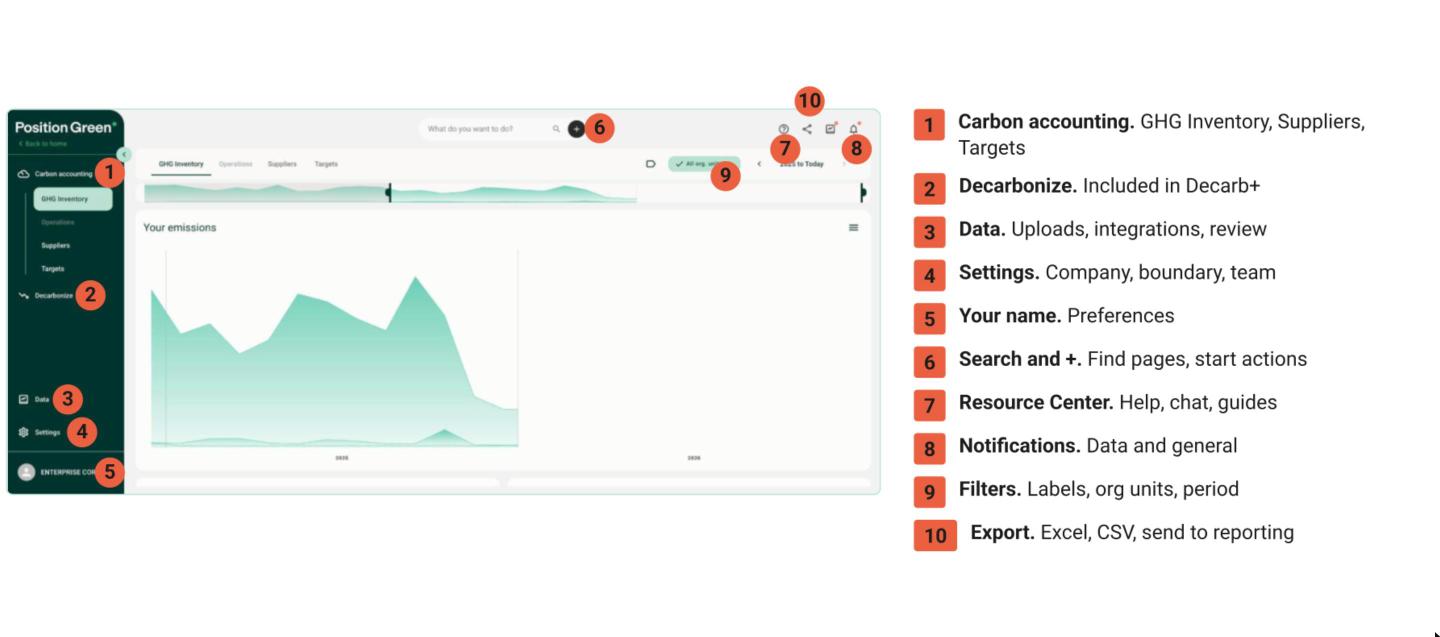
Main menu to the left
- Carbon accounting: your emissions. GHG Inventory, Suppliers and Targets.
- Decarbonize: scenarios and reduction actions. Included in Decarb+.
- Data: bring data into your carbon accounting. Uploads, integrations, review and emission factors.
- Settings: four tabs. Company settings, Organizational boundary, and My team.
- Your name:
- User preferences: language, preferred currency, measurement system and default Scope 2 method (location-based or market-based). Preferences are personal. They change what you see, not what colleagues see.
- Switch customer: for users with access to more than one company.
Top bar
- Search: type what you want to do and search for emission factors. Click + next to the search bar for suggested actions, such as Upload data.
- Notifications: two feeds, one for data and one for general updates. Notifications are personal to the user.
- Export: the share icon. Export as Excel or CSV, or send to reporting.
- Resource Center: the ? icon. Search for help, chat with us, open Knowledge Hub, see what's new, join a webinar or take the product walkthrough.
Filters
The filter bar works in every view. Filter by label, organizational unit and period.
FAQ
Where do I find my emission report?
Your emissions live in the views under Carbon accounting. To get the numbers out, use Export (the share icon).
Compliance reports such as ESRS, VSME and GRI are built in Sustainability Reporting. If you are connected, Send to reporting moves your figures into ESRS and VSME without retyping.
Was this article helpful?
That’s Great!
Thank you for your feedback
Sorry! We couldn't be helpful
Thank you for your feedback
Feedback sent
We appreciate your effort and will try to fix the article